

Key Takeaways
Option A
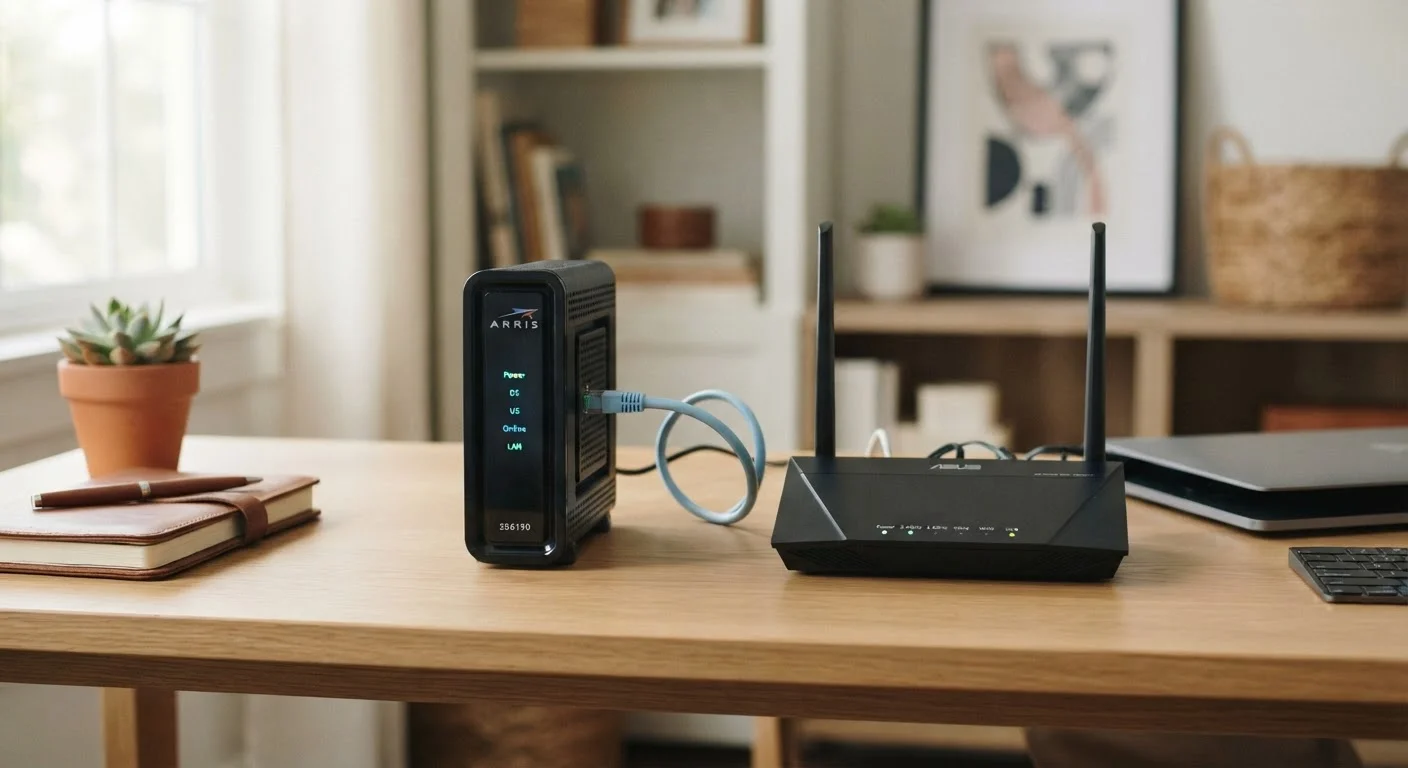
Modem
The gateway between your home and the internet.
Best for: Translating your ISP's signal into a form your home network can actually use.
Option B
Router
The traffic director inside your home network.
Best for: Distributing a working internet connection to every device in your household via Wi-Fi or ethernet.
If your Wi-Fi signal is weak or inconsistent in parts of your home
Router
Weak indoor coverage is a router (or router placement) problem. A better router with stronger antennas or a mesh system addresses this directly - your modem plays no role in indoor signal distribution.
If your connection drops entirely and no devices can reach the internet
Modem
A total loss of internet access - even when Wi-Fi shows as connected - typically points to the modem or the ISP line feeding it. Start troubleshooting there before touching the router.
If you want to reduce your monthly ISP equipment rental fee
Modem
ISPs typically charge a monthly rental fee specifically for the modem or gateway. Purchasing a compatible modem outright is often where the savings come from over time.
If you need to set parental controls, guest networks, or device prioritization
Router
All of these features live in the router. The modem has no awareness of which devices are on your network or how traffic should be managed between them.
What Each Device Actually Does
Think of your internet connection as a two-stage process. First, a signal from your internet service provider (ISP) arrives at your home through a coaxial cable, phone line, or fiber optic line - depending on your connection type. The modem (short for modulator-demodulator) receives that signal and translates it into a standard digital format that home networking equipment can understand. It speaks two languages: the ISP's protocol on one side, and plain ethernet on the other.
The router then takes that translated connection and manages traffic among all the devices in your home - phones, laptops, smart TVs, and anything else connected to your network. It assigns each device a local IP address, enforces your network's security rules, and creates the Wi-Fi signal your devices connect to wirelessly. Without the modem, there's no internet to distribute. Without the router, only a single device could use the connection at a time.
For a deeper look at how different ISP connection types affect what your modem needs to support, see our guide to home internet connection types.
| Criterion | Modem | Router |
|---|---|---|
| Primary function | Connects home to ISP network | Distributes connection among home devices |
| Talks to | Your internet service provider | Your phones, laptops, smart TVs |
| Creates Wi-Fi | No | Yes |
| Assigns local IP addresses | No | Yes |
| Needed for internet access | Yes - required | Yes, for multiple devices |
| Often rented from ISP | Yes, commonly | Less commonly |
| Relevant when upgrading for speed | ISP-side speed ceiling | In-home speed and range |
| Controls parental filters or guest networks | No | Yes |
The Gateway: When Both Jobs Are Combined
Many ISPs supply a single device called a gateway - a combined modem and router in one box. Gateways are common with cable and fiber providers and simplify setup considerably. They're the reason many households don't actually have two separate boxes at all.
Gateways are convenient, but they involve trade-offs. Because the modem and router functions share hardware, replacing or upgrading one means replacing the whole unit. Standalone routers sold at retail often offer more advanced features - better range, stronger security controls, and greater customization - than the built-in router component of a rental gateway.
Renting vs. Owning Your Gateway
ISPs typically charge a monthly fee to rent a gateway or modem. Purchasing a compatible modem outright can eliminate this recurring charge, though you'll need to verify compatibility with your specific ISP and plan before buying. Router hardware is almost always purchased rather than rented, whether you use a separate router or rely on a gateway's built-in routing functions.
Understanding whether you have a gateway or two separate devices matters when something goes wrong. Our home network troubleshooting guide walks through how to isolate which component is causing a problem.
Why the Distinction Matters in Practice
Knowing which device does what has real practical value. When your internet goes down, the modem is the first thing to check - if its indicator lights show no connection to the ISP, the problem is either the modem itself or the line coming into your home. If the modem looks healthy but your devices can't connect, the router is the more likely culprit.
The distinction also matters when you're thinking about upgrades. Slow speeds that your ISP's plan should support but your devices never seem to reach could indicate a router that can't handle modern Wi-Fi standards. Frequent dropped connections or failure to authenticate with the ISP's network point toward the modem. Treating them as interchangeable leads to frustrating, expensive trial-and-error.
If you're deciding between wired and wireless connections for specific devices, the router is the relevant hardware - the modem has no bearing on that choice. Our article on wired vs. Wi-Fi connections explains when plugging directly into the router makes a meaningful difference.
For a broader look at how modems, routers, and gateways fit together as a system, the full hardware overview covers each component in more depth. You can also explore all our coverage on the Home Internet hub.